
- Authors

- Name
- Stephen ♔ Ó Conchubhair
- Bluesky
- @stethewhitefox.bsky.social
Introduction
Arrays and Hashing is the first category in my post LeetCode Starting Over with NeetCode as they are the most used and fundamental concepts in data structures. This is my approach to solving NeetCode problems.
If you have more problems to add or any specific points you want to discuss, please feel free to share!
- Why Arrays and Hashing?
- Contains Duplicate (Easy) Solution
- Valid Anagram (Easy) Solution
- Two Sum (Easy) Solution
- Group Anagrams (Medium) Solution
- Top 𝐾 Frequent Elements (Medium) Solution
- Encode and Decode Strings (Medium)
- Product of Array Except Self (Medium)
- Valid Sudoku (Medium)
- Reference
Why Arrays and Hashing?
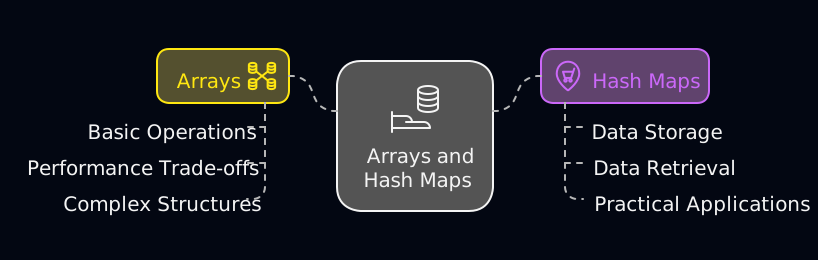
Starting with these concepts allows for a solid understanding of basic operations, performance trade-offs, and practical applications in programming and algorithm design.
Arrays are the most used and fundamental data structures, providing a strong foundation for understanding more complex structures. Hash maps, on the other hand, are crucial for efficient data storage and retrieval, making them the second most important and commonly used data structures.
Arrays
An array is a linear, index-based collection of values.
While JS arrays are dynamically sized and can store mixed types, they are conceptually treated as continuous memory structures in algorithm problems.
💡 Pro-Tip: The V8 Engine Optimization In languages like C++ or Rust, an array is a fixed-size, contiguous block of memory. In TypeScript, the V8 engine (which powers Chrome and Node.js) manages memory for us.
- Fast Elements access due to contiguous memory allocation.
- Holey/dictionary if mixed types or sparse indices are used, V8 may switch to a hash map-table like structure internally leading to slower access times.
Takeaway for Interviews: Even though TypeScript is flexible, treat your arrays like they are fixed-type and contiguous. This ensures your mental model aligns with how the most efficient algorithms are designed to work.
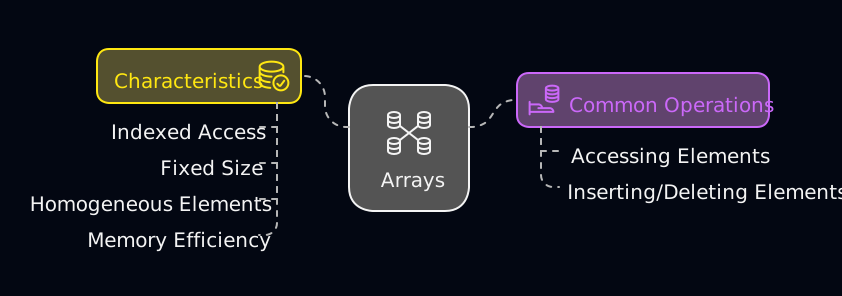
Characteristics:
- Indexed Access: Elements are accessed using their index, providing constant-time complexity for retrieval.
- Fixed Size (Conceptually): In algorithm problems, arrays are conceptually treated as having a fixed size even if they are dynamically sized in practice.
- Homogeneous Elements: Typically store elements of the same type.
- Memory Efficiency: Contiguous memory allocation makes arrays memory efficient.
Common Operations:
- Accessing Elements:
- Inserting/Deleting Elements: when inserting or deleting in the middle of the array due to the need to shift elements.
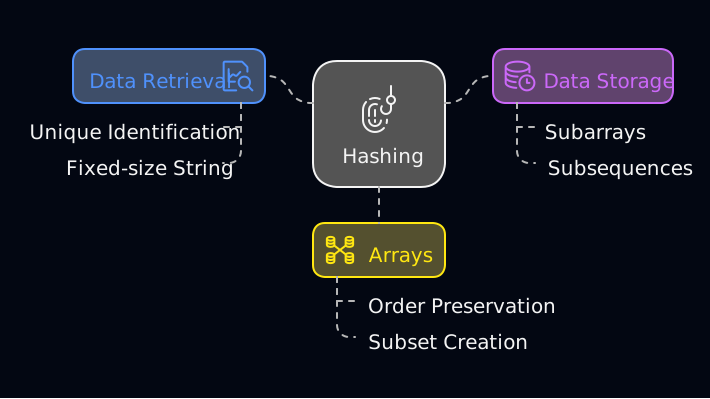
Arrays can be used to create a subarray and subsequences, which are subsets of the array that preserve the order of elements.
Hashing
Hashing is a technique used to uniquely identify a specific object from a group of similar objects. It involves converting an input (or key) into a fixed-size string of bytes, usually for faster data retrieval and storage.
In algorithm problems, hashing is commonly used to trade space for time — allowing us to reduce nested loops into constant-time lookups.
🧠 Common Arrays & Hashing Patterns
Most problems in this category follow one of these core patterns:
Existence Checking
Check whether a value has already been seen using a set or hash map
(e.g. Contains Duplicate, Two Sum, Valid Sudoku)Frequency Mapping
Track how often each value appears using a hash map
(e.g. Valid Anagram, Group Anagrams, Top Frequent Elements)Index Mapping
Map values to their indices to enable fast lookups and index-based answers
(e.g. Two Sum)Prefix / Suffix (Accumulation)
Store running totals or products for the left (Prefix) and the right (Suffix) to calculate values relative to an element. (e.g. Product of Array Except Self)Encoding / Decoding
Convert structured data into a reversible string representation
(e.g. Encode and Decode Strings) Recognizing these patterns early makes it easier to choose the right data structure and avoid brute-force solutions.
The key idea is often the same — use a hash map (or set) to store previously seen elements for quick lookups.
| Pattern | Goal | Typical Big | Kitchen Analogy |
|---|---|---|---|
| Existence Checking | "Have I seen this before?" | Time / Space | Checking the mise en place to see if a vegetable is already prepped. |
| Frequency Mapping | "How many times did this happen?" | Time / Space | Tallying ingredients in your mise en place to ensure you have enough for the recipe. |
| Index Mapping | "Where did I see this?" (fast lookups) | Time / Space | Labelling shelves in your kitchen for quick access. |
| Prefix / Suffix | "What is the before/after this element?" | Time / Space | Preparing ingredients in advance (prefix) and having backup ingredients ready (suffix) for efficient cooking. |
| Encoding / Decoding | "How do I serialize/deserialize this data?" | Time / Space | Vacuum-sealing ingredients and labeling them with their weight for later. |
Contains Duplicate (Easy) Solution
Understanding the Problem: To understand hashing, let's look at a classic duplicate-detection problem. We check if there are any duplicate elements in a numbers array nums. The task is to determine whether any value appears at least twice in the array.
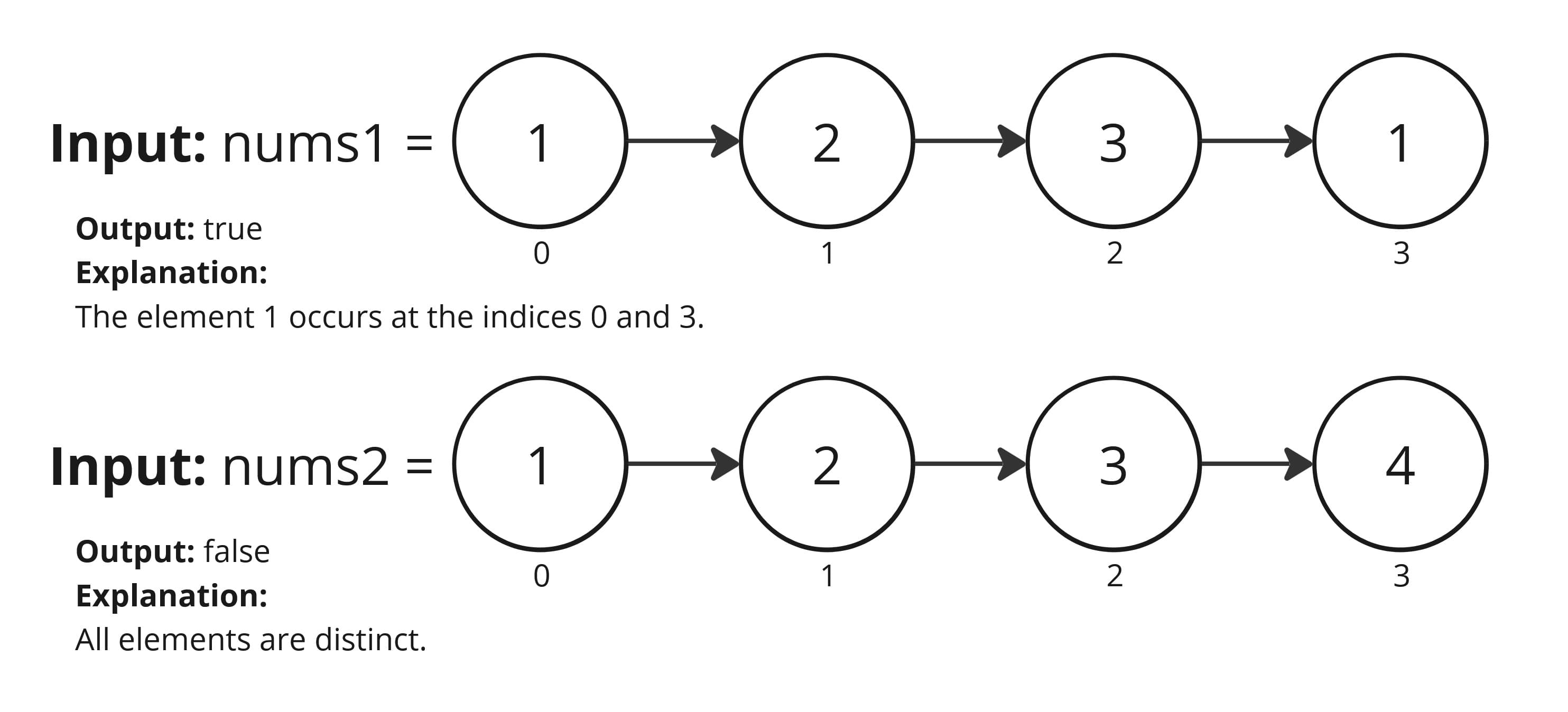
Let's break down how to solve the NeetCode.io Contains Duplicate: problem. First a brute force and then in TS, an optimal solution with intuition and a step-by-step approach on how to solve the problem.
Pseudocode (Brute Force 💪)
Pseudocode
function containsDuplicate(nums):
  if nums empty return false

  // Loop through each element in array
  for i from 0 to nums.length - 1
      // Compare the current element with every other element
      for j from i + 1 to nums.length
          // Check if for duplicate
          if nums[i] === nums[j] return true

  // If not found in the double loop
  return false
Complexity
- Time: nested loops less efficient for large datasets.
- Space: constant.
TypeScript (Optimal 🎯)
Intuition
To efficiently determine if the nums array has any duplicates, use a hash set a Set is ideal as it only stores unique values and cannot contain duplicates. This method enables us to keep track of elements in constant time, ensuring a quick and efficient check for duplicates.
An edge case to consider is an empty array, which naturally returns false as no duplicates can exist.
Note: In TypeScript, the Set object lets you store unique values of any type, whether primitive values or object references. As NeetCode problems typically involve primitive types (like numbers or strings), using a Set is straightforward and efficient for this purpose. LeetCode's Contains Duplicate/
Approach
Initialize a
Set: Create and emptySet<number>to store the values we have already encountered in thenumsarray.Loop through Array: Iterate through each element in the
numsarray.Compare for Duplicates: Use the
.has()method to see if the current number is already in theset.
- If it exists: return
trueimmediately as we have found a duplicate. - If it does not exist: add the current number to the
setusing the.add()method. this ensures that we can check for the number again in time in future iterations.
- Return
false: If no duplicates are found.
Complexity
- Time: - We iterate through the array once, and each lookup and insertion in the
Setis . - Space: all elements are distinct, worst case.
const containsDuplicate = (nums: number[]): boolean => {
    // A Set only stores unique values, making it perfect for finding duplicates
    const set = new Set<number>()

    for (let i = 0; i < nums.length; i++) {
        // .has() checks for existence in constant time
        if (set.has(nums[i])) return true
        // Add the current number to 'memory' for future checks
        set.add(nums[i])
    }

    return false // No duplicates found
}

// Example usage
const nums: number[] = [1, 2, 3, 1]
console.log(containsDuplicate(nums)) // Output: true
Valid Anagram (Easy) Solution
Understanding the Problem: Determine if two strings are anagrams of each other. We need to ensure that the strings have the same characters with the same frequencies.
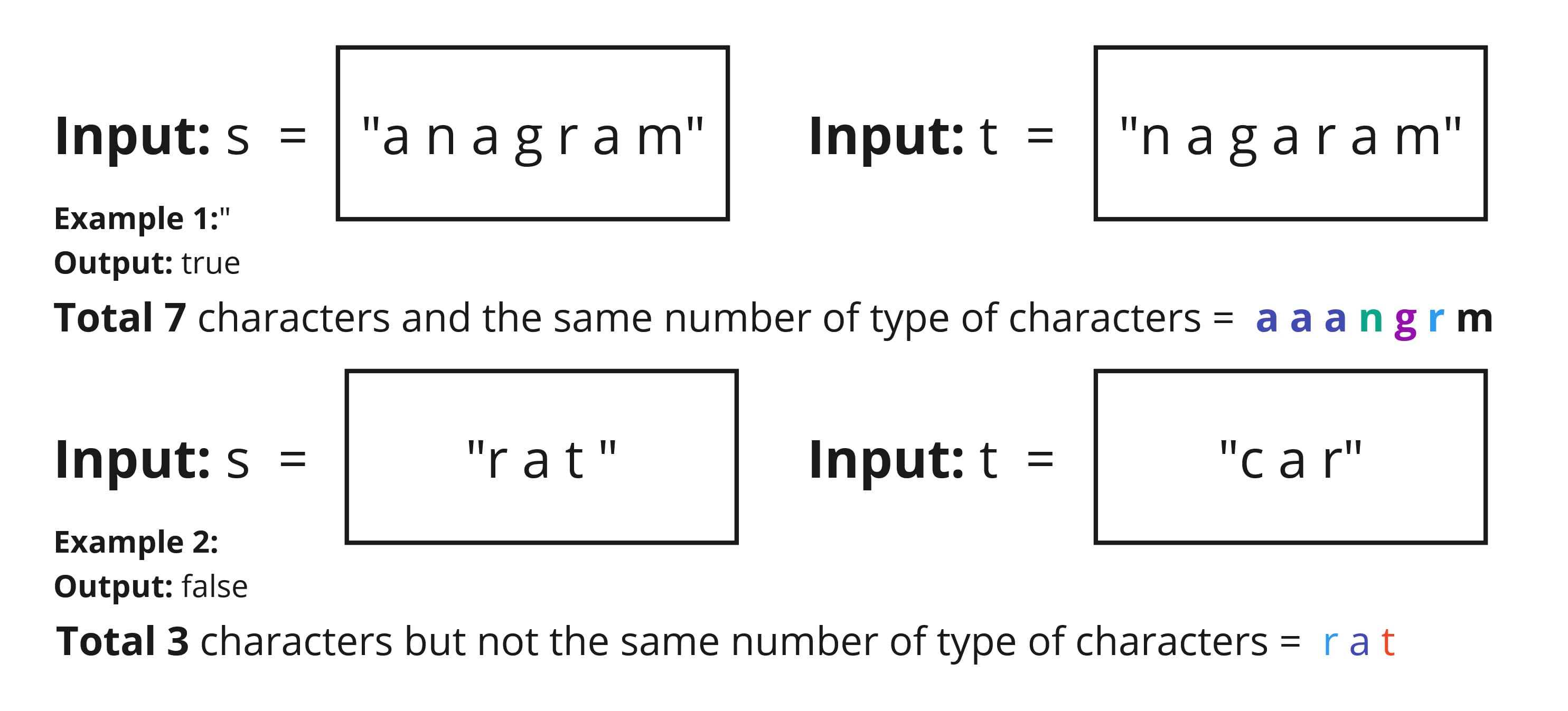
This problem is from NeetCode.io Valid Anagram. We'll explore two approaches: a brute force method and then in TS, a more efficient solution using a hash map.
Pseudocode (Brute Force 💪)
Pseudocode
function validAnagram(s, t):
    if length of s !== t: return false

    /// Sort both strings
    sortedS = sort characters of s
    sortedT = sort characters of t

    // Compare sorted stings
    return sortedS === sortedT
This approach is simple and effective. It has a time complexity of due to the sorting step, where is the length of the strings and space complexity is .
TypeScript (Optimal 🎯)
Intuition
💡Hint:
When solving anagram problems in code, focus on character counts, not whether the result forms a real word or makes sense.
Two strings are anagrams if and only if they share the exact same "recipe"—using the kitchen analogy, the same ingredients (characters) in the same quantities. Instead of sorting (alphabetizing the mise en place) which takes we simply count the ingredients. If the counts match, the words are anagrams. This solves the problem in Linear Time .
Approach
The "Ingredient length" Check (Edge Case): If lengths of strings
sandtdon't match, returnfalse. Anagrams must be the same length (size).Character Count (adding to the mise en place): Create a "Hash Map", iterate through the first string
sand increment the count (frequency) of each character.Validate Against Second String: Iterate through the second string
tand validate against the hash map.
- If the character does not exist in the hash map or its count is zero return
false(meaning the character is not in the first string). - Decrement the count for each matched character to indicate it has been accounted for.
- If all characters are matched successfully, the two strings have identical character frequencies.
- Completion If the loop finishes without returning false the recipes match perfectly. Return
true.
Complexity
Time: , We iterate through string
sand stringtonce to build the inventory (ingredients) and then verify it. In big terms simplifies to .Space:
(Constant), for a fixed character set (e.g., 26 lowercase english letters).
(Linear) in general, where is the number of unique characters in the strings.
⚡ can include letters from multiple languages, symbols, or even emojis. For LeetCode-style inputs, we usually assume a fixed character set, s and t consist of lowercase English letters.
const validAnagram = (s: string, t: string): boolean => {
    if (s.length !== t.length) return false

    const countChar: Record<string, number> = {}

    for (const char of s) {
        countChar[char] = (countChar[char] || 0) + 1
    }

    for (const char of t) {
        if (!countChar[char]) return false

        countChar[char]--
    }

    return true
}

// Example usage
console.log(validAnagram('listen', 'silent')) // true
console.log(validAnagram('hello', 'world')) // false
Two Sum (Easy) Solution
Understanding the Problem: Given an array of integers nums and an integer target, return the indices i and endIdx such that nums[i] + nums[j] === target and i !== j. You can safely assume that every array will have a valid pair of integers that add up to the target. In other words, there will always be at least one solution in the array.
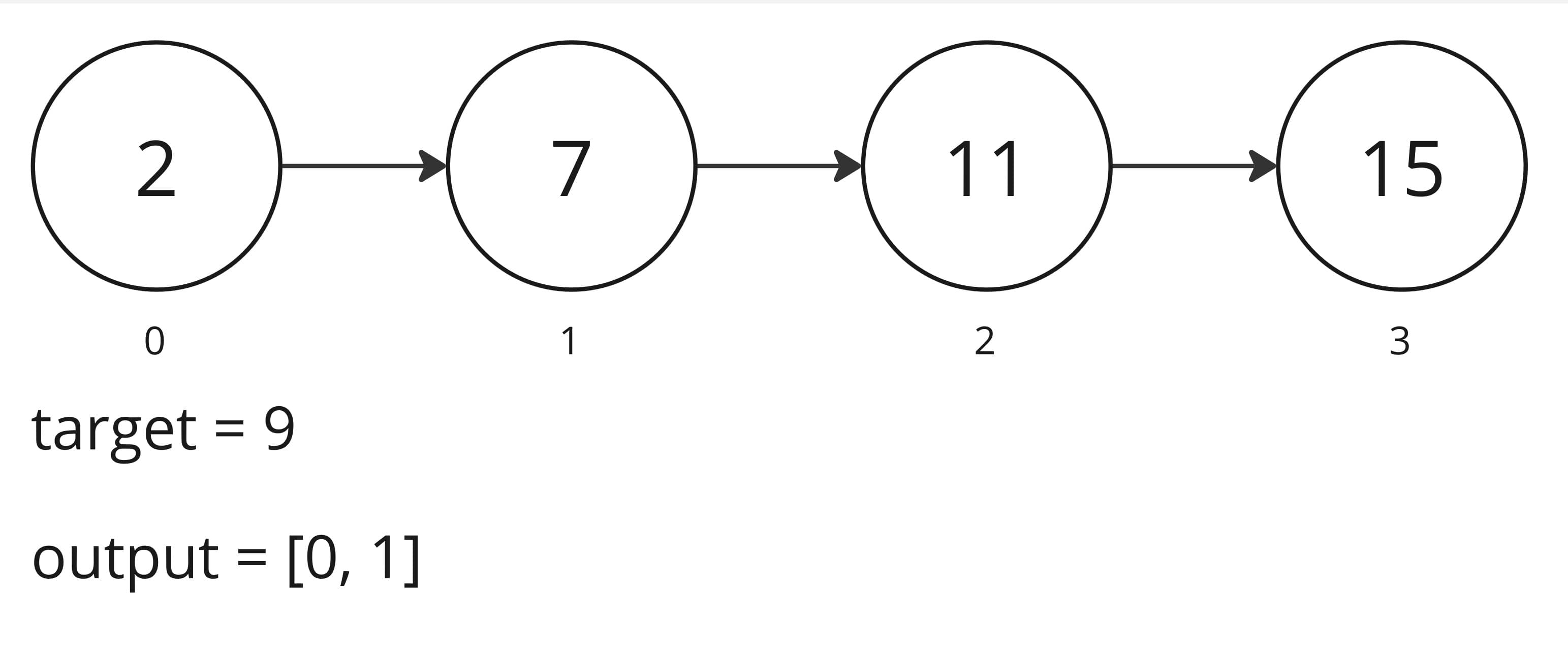
Explanation: Because nums[0] + nums[1] = 9, we return [0, 1]
Let's break down how to solve the NeetCode.io Two Sum problem. First a brute force and then in TS, an optimal solution with intuition and a step-by-step approach on how to solve the problem.
Pseudocode (Brute Force 💪)
Pseudocode
function twoSum(nums, target):
    //  Iterate over the array with index i
    for i from 0 to length of nums - 1:
      // Iterate over the array with index j, starting from i + 1 to avoid using the same element twice
       for j from i + 1 to length of nums - 1:
        // Check if the sum of nums[i] and nums[j] equals the target
        if nums[i] + nums[j] === target:
          // If true, return the indices as the solution
          return [i, j]

    // If no solution is found, return an empty list or handle the case as needed
    return []
Using nested loops to check each pair in the array results in a time complexity of , which can be inefficient for larger arrays due to the exponential growth in computation time.
TypeScript (Optimal 🎯)
Intuition
Instead of checking every possible pair with nested loops, we can use a hash map to store the numbers we have seen so far along with their indices. This allows us to check in constant time whether the complement (i.e., target - current number) exists in the map.
Note: While NeetCode's practice platform provides a great environment for many problems, if you are practicing this specifically on LeetCode's Two Sum using TypeScript allows you to leverage the Map object for high-performance lookups.
Approach
Initialize a hash map:
const numsMap = new Map<number, number>()to store{ number: index }pairs.Iterate through the
numsArray:- Compute the
complement: target - nums[i]the complement is the number needed to reach the target when added to the current number. - Check the Map If the map contains the
complementwe found our pair!. - Return Indices: Use
return [numsMap.get(complement), i]to get the stored index and return it along with the current index. - Store current number: If not found, use
numsMap.set(nums[i], i)to save the number for future checks.
- Compute the
Fallback: If no such pair is found, return an empty array
[].
Complexity
Time: - We traverse the list containing 𝑛 elements only once. Since hash map lookups and insertions each take on average, the total time complexity is linear.
Space: - In the worst case (e.g., the matching pair is at the very end of the array), we store 𝑛 elements in the hash map.
const twoSum = (nums: number[], target: number): number[] => {
    /// Hash map to store number → index
    const numsMap = new Map<number, number>()

    for (let i = 0; i < nums.length; i++) {
        // Calculate the complement needed to reach the target
        const complement = target - nums[i]

        // Check if complement is already stored in the hash map
        if (numsMap.has(complement))
            /* We use .get() because numsMap is a Map object.
            The '!' tells TypeScript that we are certain this value
            is not undefined because of the .has() check above.
            */
            return [numsMap.get(complement)!, i]

        // Store the current number and its index in the hash map
        numsMap.set(nums[i], i)
    }

    return []
}

// Example Usage
const nums1: number[] = [2, 7, 11, 15]
const target1 = 9 // output [0,1]
const nums2: number[] = [3, 2, 4]
const target2 = 6 // output [1,2]
const nums3: number[] = [3, 3]
const target3 = 6 // output [0,1]

console.log('two sum: ', twoSum(nums1, target1)) // output [0,1]
Group Anagrams (Medium) Solution
Understanding the Problem: We are given an array/list of strings strs, the task is to group all anagrams together into sub-lists. Anagrams are strings/words or phrases (not used in this problem) that contain the same characters/letters with the same frequencies. The answer can be returned in any order.
Example of anagrams:
- "listen" and "silent"
- "evil" and "vile"
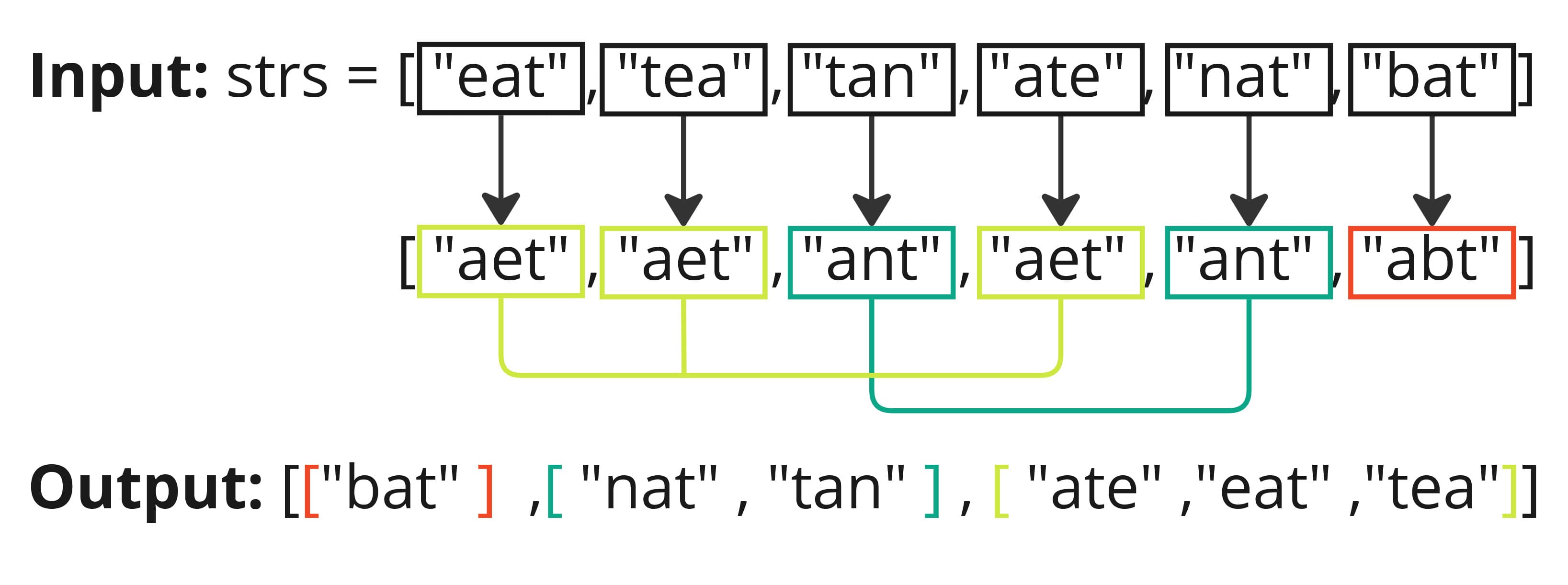
First let's break down how to solve the NeetCode.io Anagram Groups problem using a brute force solution with sort and then we will look at a more optimal TS solution.
Pseudocode Approach (Brute Force 💪)
- Create an empty "Hash Map" (plain object)
groupto store the grouped anagrams. - Loop through each string
sin the input list. - For each string
s, sort its characters to create a keysignature - If this
signatureis not in the map, initialize it with an empty list - Push the string to the group corresponding to its
signature - Return the
valuesof thegroupobject as a list of anagrams
Pseudocode
function groupAnagrams(strs):

  group = {}

  for each string s of strs:
    signature = sort characters of s and join into a string

    if signature not in group:
      group[signature] = []

    add s to the list corresponding to signature in group

  return values of group
Complexity
- Time: where is the number of strings in the input list and is the maximum length of a string. Sorting each string takes , and we do this for all strings.
- Space: where is the number of words in the input list and is the maximum length of a word. We split each word into a character array to sort it and store it in the hash map.
TypeScript (Optimal 🎯)
Intuition
💡 Hint:
When solving anagram problems in code, focus on character counts, not whether the result forms a real word or makes sense.
So this solution is similar to the brute force however the main difference is instead of sorting each string (which costs time per word), we build a 26-length frequency array for each string, counting how many times each character appears.
We then use this is as a unique signature for the anagram group. This gives us an signature, which we convert into a string key signature.
Words with the same character counts will generate the same key, allowing us to group them more efficiently.
If we use the kitchen analogy:
- Sorting is like arranging the ingredients in alphabetical order.
- Counting characters is like counting how many of each ingredient you have.
⚠️ This approach assumes all strings consist of lowercase English letters (a–z), which matches the constraints of the NeetCode problem.
Approach
Initialize: Create an empty "Hash Map" (a plain object) called
groupwhere each key is a character-frequency signature and each value is a list of words belonging to that group.Count Characters: Iterate through
strsand for each strings, create acountChararray of size 26 zeros.Iterate through the characters of the string and initialize an array to count the frequency of each character using the
charCodeAtmethod (Returns the Unicode value of the character at the specified location), update the corresponding index based on the letter (a → 0, b → 1, ..., z → 25) using its ASCII code. For example ASCII code for 'a' is 97.Create a Signature: Convert the
countChararray into a string (e.g., "1,0,0,0,1,0,...") to a string using.join(',')This transforms our temporary memory-reference (the array) into a stable value-based key (the string)signaturethat the Hash Map can use to group matching anagrams.Store the Word: If the
signaturedoesn't exist ingroup, initialize it with an empty array. Then push the current word into the corresponding group.Return Result: After processing all the strings, return the group anagrams as an array of arrays using
Object.values(group).
Complexity
- Time: where is the number of strings and is the average length of the strings.
- Space: for storing strings in the dictionary.
const groupAnagrams = (strs: string[]): string[][] => {
    const group: { [key: string]: string[] } = {}

    for (const s of strs) {
        const countChar: number[] = new Array(26).fill(0)

        for (const c of s) {
            countChar[c.charCodeAt(0) - 97]++
        }

        const signature = countChar.join(',')

        if (!group[signature]) group[signature] = []

        group[signature].push(s)
    }

    return Object.values(group)
}

// Example Usage
const strs = ['eat', 'tea', 'tan', 'ate', 'nat', 'bat']
console.log(groupAnagrams(strs)) // Output: [["bat"],["nat","tan"],["ate","eat","tea"]]
Top 𝐾 Frequent Elements (Medium) Solution
Understanding the Problem: Given an integer array nums and an integer k return the k most frequent elements in nums. The order of the returned elements does not matter.
Example 1:
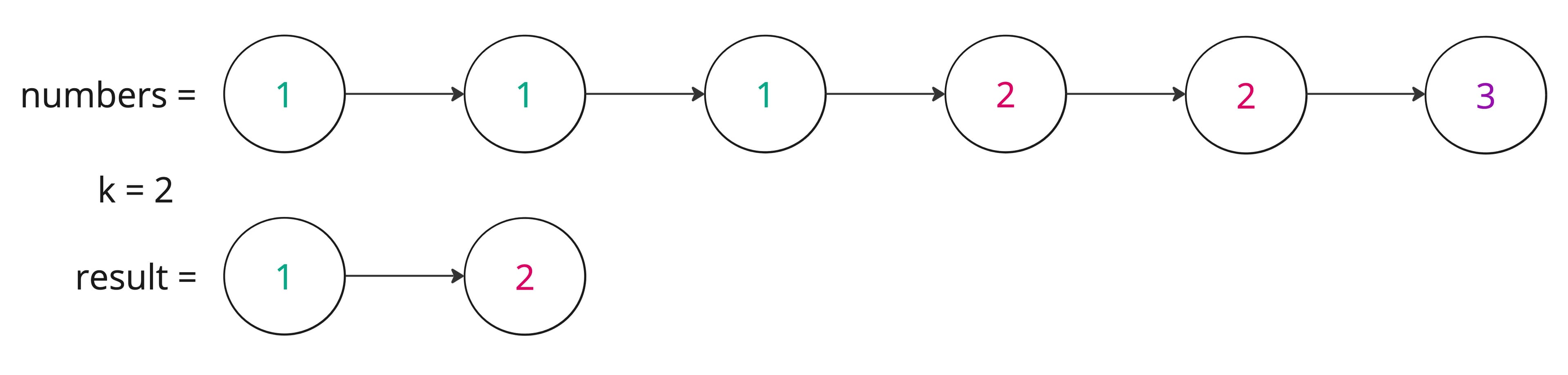
Example 2:
Input: nums = [1], k = 1
Output: [1]
Let's break down how to solve the NeetCode.io Top K Frequent Elements problem. First a brute force and then in TS, an optimal solution with intuition and a step-by-step approach on how to solve the problem.
Pseudocode (Brute Force 💪)
Intuition
This brute force solution starts by finding the most frequent elements this involves counting the frequency of each element and then sorting them to extract the top k.
Sorting Approach
- Count Frequencies: Create a frequency map (hash map / plain object) by iterating through the
numsarray to count the frequency of each number.
💡 Hint: For cleaner code, we can use a shorthand expression (freqCount[num] || 0) + 1 it initializes the count to 0 when the number is first encountered, and increments it by 1 on subsequent encounters.
Transform & Sort: Initialize an array to convert the hash map into a list of pairs where each pair is
[number, frequency]and sort by the frequency value in descending order (the second element of each pair).Extract: Create an empty result array and iterate from
0tok - 1, adding the first element (the number) from each sorted pair.Return the result array containing the top
kfrequent numbers.
Pseudocode
function topKFrequent(nums, k):
    freqCount = {}

    for each num of nums:
        freqCount[num] = (freqCount[num] || 0) + 1

    countArr = entries(freqCount)
    sort countArr by frequency in descending order

    topK = []

    for i from 0 to k - 1
        append countArr[i][0] to topK

    return topK
Input: nums = [2, 4, 4, 6, 6, 6] k = 2
Output: [6, 4] as 6 appears three times and 4 appears two times.
Complexity
Time:
- Counting the freq of each element takes where is the total number of elements in
numsand is the number of unique elements. - Sorting the unique elements takes .
- Counting the freq of each element takes where is the total number of elements in
Space:
- The
freqCountuses space to store the frequency of each unique element. - The
countArruses space when sorting the elements. - The result array
topKuses space, where is the top freq elements returned.
- The
TypeScript Min-Heap
Intuition
We want the k most frequent values from the nums array. Instead of sorting all unique elements — which would take time — we can use a min-heap (priority queue) of size k to efficiently keep track of the top k frequent elements.
The min-heap always keeps the element with the smallest frequency at the root, making it easy to remove when a more frequent element appears.
Approach
Count Frequencies: Use a
Mapto count how many times each number appears in thenumsarray.Populate Map:
💡 Hint: Since Map stores key-value pairs, we use .set() and .get() to manage the counts: freqCount.set(num, (freqCount.get(num) || 0) + 1). This initializes the count to 0 if the number hasn't been seen before; otherwise increments the existing count.
- Create Min-Heap: Create a
MinPriorityQueue<{ num: number, count: number }>where:
- The priority is based on
count - The root always contains the smallest frequency.
- Maintain Top K in Heap For each
[num, count]of theMap:
- Insert (
enqueue){ num, count }into the heap. - If the heap size exceeds
k, remove (dequeue) the root → ensures only the k most frequent elements remain.
- Extract Result:
- Remove all remaining elements from the heap.
- Collect their
numvalues into a result array. - Return result (order does not matter).
📌 Example:
| Heap (min-heap by count) | Result |
|---|---|
[ {4,2}, {6,3} ] → dequeue | [4, 6] |
Complexity
- Time:
- for iterating through
numsarray and counting into the freqCount, where is the length ofnums. - for inserting unique elements into a heap of size , as each insertion/removal takes time.
- for iterating through
- Space:
- The
freqCountuses space to store the frequency of each unique element. - The min-heap uses space to store the top
kfrequent elements.
- The
function topKFrequent(nums: number[], k: number): number[] {
    const freqCount = new Map<number, number>()

    for (const num of nums) {
        freqCount.set(num, (freqCount.get(num) || 0) + 1)
    }

    const heap = new MinPriorityQueue<{ num: number; count: number }>(
        (entry) => entry.count
    )

    for (const [num, count] of freqCount) {
        heap.enqueue({ num, count })

        if (heap.size() > k) heap.dequeue()
    }

    const topK = []
    while (heap.size() > 0) {
        topK.push(heap.dequeue().num)
    }

    return topK
}

const numbers: number[] = [2, 2, 2, 4, 4, 6]
const k: number = 2

console.log(topKFrequent(numbers, k)) // Array [ 2, 4 ]
TypeScript Bucket Sort (Optimal 🎯)
Intuition
We can use a bucket sort approach to efficiently find the top k frequent elements.
The idea is to create an array of buckets where each index represents a frequency. Each bucket at index i contains all numbers that appear exactly i times in the nums array.
Approach
Count Frequencies: Use a Map to count the frequency of each number in the
numsarray.Create Buckets: Create an array of empty arrays where the index represents frequency. The size of this array will be
nums.length + 1because the maximum possible frequency of any number isnums.length(if all elements are the same).Populate Buckets: For each
[num, count]in the frequency map, pushnumintobuckets[count].Collect Top K Elements: Traverse the buckets in reverse (from highest frequency to lowest) collecting numbers until
kelements have been gathered.
If we use the example: const numbers: number[] = [2, 2, 2, 4, 4, 6]
The frequency map would be:
- 2 → 3 times
- 4 → 2 times
- 6 → 1 time
- Index = frequency
- Value = numbers with that frequency
| Index: | 0 | 1 | 2 | 3 | 4 | 5 | 6 |
|---|---|---|---|---|---|---|---|
| [] | [] | [] | [] | [] | [] | [] | |
| Bucket | [] | [6] | [4] | [2] | [] | [] | [] |
- Buckets 4–6 are unused, but they must exist because the maximum frequency of any number can be
nums.length(if all elements are the same). - This reinforces why
nums.length + 1is needed.
💡 Hint: We iterate backwards through the buckets so we process higher frequencies first and stop when we have collected k elements. Use a loop like: for (let freq = buckets.length - 1; freq >= 0; freq--)
| freq | bucket | action |
|---|---|---|
| 6 | [] | skip |
| 5 | [] | skip |
| 4 | [] | skip |
| 3 | [2] | add → topK = [2] |
| 2 | [4] | add → topK = [2, 4] |
| stop | k reached | ✅ |
Complexity
- Time: — counting, bucketing, and collecting in linear time. Even though we have nested loops, each element is processed a constant number of times.
- Space: — for the frequency map and the buckets.
function topKFrequent(nums: number[], k: number): number[] {
    const freqCount = new Map<number, number>()

    for (const num of nums) {
        freqCount.set(num, (freqCount.get(num) || 0) + 1)
    }

    const buckets: number[][] = Array.from(
        { length: nums.length + 1 },
        () => []
    )

    for (const [num, count] of freqCount) {
        buckets[count].push(num)
    }

    const topK: number[] = []
    for (let freq = buckets.length - 1; freq >= 0; freq--) {
        for (const num of buckets[freq]) {
            topK.push(num)

            if (topK.length === k) return topK
        }
    }
}
const numbers: number[] = [2, 2, 2, 4, 4, 6]
const k: number = 2

console.log(topKFrequent(numbers, k)) // Array [ 2, 4 ]
Encode and Decode Strings (Medium)
Understanding the Problem:
This solution walks through a classic interview problem: converting an array of strings into a single encoded string, and decoding it back.
Design an algorithm to encode a list of strings to a single string. The encoded string is (sent over the network) then decoded back to the original list of strings.
Implement encode and decode.
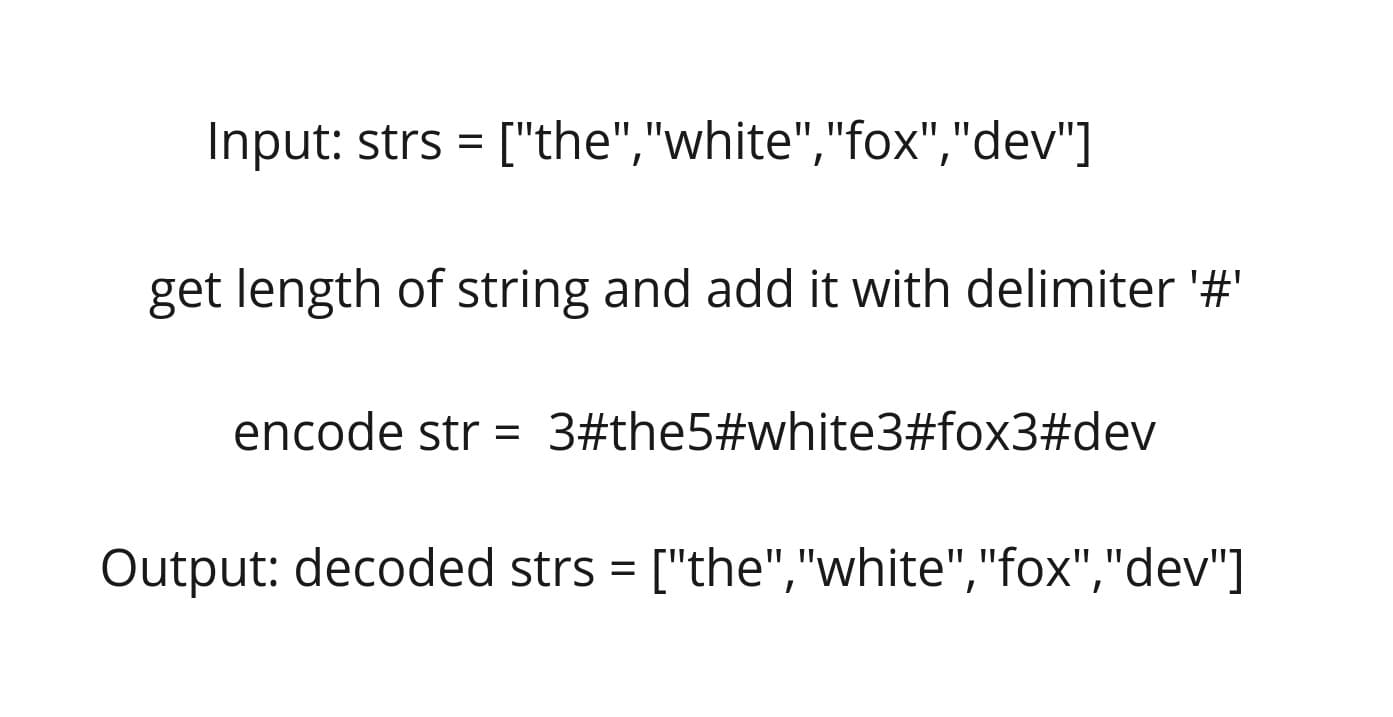
Let's break down how to solve the NeetCode.io Encode and Decode Strings problem. First a brute force and then in TS, an optimal solution with intuition and a step-by-step approach on how to solve the problem.
Pseudocode (Brute Force 💪)
Encode String
create an empty string to store the encoded string
Iterate through strings to create an escaped string by replacing any colons in the string with a delimiter and append the length of the escaped string to the encoded string.
Return the encoded string
Decode String
Create a list array to store decoded strings and initialize index (marker) set to
0Loop through the length encoded string to find the index of the delimiter
Get the length of the string and move the index after the delimiter
Escape the str using substring of the idx and the idx length extract substring from idx up to (but not including) idx + strLength
Replace double colons with single colons and add the decoded string to the list and move the index forward by the strLength.
Return decode strings
Pseudocode
function encode(strs):
  encodedStr = ""


  for each str of strs:
    escapedStr = str.replace(/:/g, "::")
    encodedStr += length(escapedStr) + ":" + escapedStr

  return encodedStr

function decode(encodedStr):
  decodedStrs = []
  idx = 0

  while idx < length(encodedStr):
    delimiterIdx = encodedStr.indexOf(":", idx)
    strLength = parseInt(encodedStr substring from idx to delimiterIdx)
    idx = delimiterIdx + 1
    escapedStr = encodedStr.substring(idx, idx + strLength)
    decodedStr = escapedStr.replace(/::/g, ":")
    append decodedStr to decodedStrs

    idx += strLength

  return decodedStrs
TypeScript (Optimal 🎯)
Intuition
Using a special character as a delimiter (e.g., :) might not be reliable because the character could already exist in one of the strings (e.g., strs = ["we", "say", ":", "yes"]). Instead, a more robust approach is to store the length of each string before the delimiter, this ensures accurate decoding without conflicts.
This is done by prepending the length of each string followed by a delimiter (e.g., #) to the string itself. For example, the string "neet" would be encoded as "4#neet", where 4 is the length of the string and # is the delimiter. This allows us to easily parse the encoded string to retrieve the original strings without worrying about special characters or delimiters.
- Encoding: The process of converting a list of strings into a single string.
- Decoding: The process of converting the encoded string back into the original list of strings.
- Delimiter: A special character used to separate the encoded strings in the final string.
- Escape: The process of replacing special characters in the string to avoid conflicts with delimiters.
Approach
Encode Function:
- Initialize Encoded String:
- Create an empty string
encodedStrto store the encoded string result.
- Loop Through Each String in the Input Array:
- For each string in the array:
- Calculate it's length.
- Append the length a delimiter (
#) and the actual string toencodedStr.
- Return:
- Return the
encodedStrwhich contains all encoded strings in the format<length>#<string>.
Decode Function:
- Initialize:
- An empty array
decodedStrsto store the decoded strings. - An index
idxto track of the current position in the encoded string.
- While Loop:
- While
idxis less than the length of theencodedStr:- Use a pointer
endIdxto find the delimiter#in the encoded string. - Increment
endIdxuntilencodedStr[endIdx] === "#". - This marks the end of the string length.
- Use a pointer
- Extract the String:
- Extract the substring using
slicefromidxtoendIdxand convert it to an integerstrLength. - Move
idxpast the delimiter (i.e.,idx = endIdx + 1). - Extract the actual string using
strLength(encodedStr.slice(idx, idx + strLength)). - Append the decoded string to the list
decodedStrs. - Update
idxto the next encoded segment's start by addingstrLengthtoidx. - Repeat until all strings are decoded
- Return decodedStrs:
- Return the array
decodedStrswhich contains all decoded strings.
Encoding example: For strs = ["neet", "code", "love", "you"] the encoding and decoding process:
| Step | Idx | endIdx | Encoded Format | slice(idx, endIdx) | Extracted Length | Extracted String | decodedStrs |
|---|---|---|---|---|---|---|---|
| 1 | 0 | 1 | "4#neet" | "4" | 4 | "neet" | ["neet"] |
| 2 | 6 | 7 | "4#code" | "4" | 4 | "code" | ["neet", "code"] |
| 3 | 12 | 13 | "4#love" | "4" | 4 | "love" | ["neet", "code", "love"] |
| 4 | 18 | 19 | "3#you" | "3" | 3 | "you" | ["neet", "code", "love", "you"] |
The decode function converts the string "4#neet4#code4#love3#you" back into the array ["neet", "code", "love", "you"].
Complexity
- Time: each character in the encoded string is processed once.
- Space: the the decoded strings are stored in an array of size
n.
/**
 * Encodes an array of strings to a single string.
 * Format: "<length>#<string>"
 * @param {string[]} strs - Array of strings to encode
 * @returns {string}
 */
function encode(strs: string[]): string {
    let encodedStr: string = ''

    // Iterate over each string in the array
    for (const str of strs) {
        // Append length, delimiter, and the string itself
        encodedStr += str.length + '#' + str
    }

    return encodedStr
}

/**
 * Decodes a single string back into an array of strings.
 * @param encodedStr - The encoded string
 * @returns Array of decoded strings
 */

function decode(encodedStr: string): string[] {
    const decodedStrs: string[] = []
    let idx: number = 0

    while (idx < encodedStr.length) {
        // Pointer to find the delimiter '#'
        let endIdx: number = idx

        // Locate the position of the delimiter '#'
        while (encodedStr[endIdx] !== '#') endIdx++ // Increment until '#' is found

        // Extract the length of the string
        // Convert the substring to an integer
        const strLength: number = parseInt(encodedStr.slice(idx, endIdx))

        // Move index past the delimiter '#' to the start of the actual string
        idx = endIdx + 1

        // Extract the string using the parsed length
        let word = encodedStr.slice(idx, idx + strLength)
        // Append the decoded string to the list
        decodedStrs.push(word)

        // Move the index forward by the length of the string to the next encoded segment
        idx += strLength
    }

    return decodedStrs
}

// Example:
// Input: `strs` = ['neet', 'code', 'love', 'you']
// Encode: `encodedStr` = '4#neet4#code4#love3#you'
// Decode: `decodedStrs` = ['neet', 'code', 'love', 'you']

function testCodec(): void {
    const strs = ['neet', 'code', 'love', 'you']
    const encodedStr = encode(strs)
    const decodedStrs = decode(encodedStr)

    console.log('Original:', strs)
    console.log('Encoded :', encodedStr)
    console.log('Decoded :', decodedStrs)

    const isEqual = JSON.stringify(strs) === JSON.stringify(decodedStrs)
    console.assert(
        isEqual,
        '❌ Test failed: Decoded output does not match the original'
    )
    if (isEqual) {
        console.log('✅ Test passed!')
    }
}

testCodec()
Product of Array Except Self (Medium)
Understanding the Problem: Given an integer array nums, the task is to return an array answer such that answer[i] is equal to the product of all the elements of nums except nums[i].
Each product is guaranteed to fit in a 32-bit integer.
The output array should not use division and should have a time complexity of O(n).
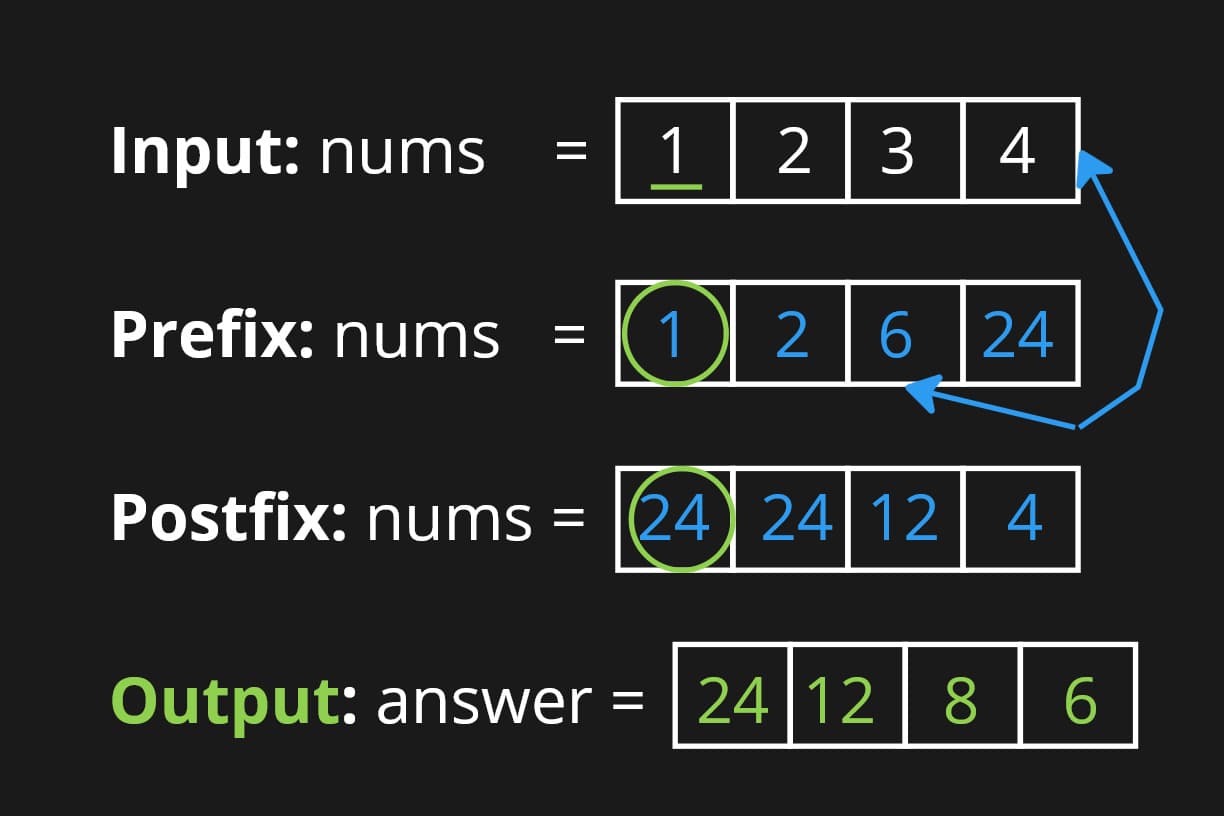
Let's break down how to solve the NeetCodeIO Products of Array Except Self problem. First a brute force and then in TS, an optimal solution with intuition and a step-by-step approach on how to solve the problem.
Pseudocode (Brute Force 💪)
Pseudocode
function productExceptSelf(nums):
  // Initialize an array to store the products
  products = []

  // Loop through each element in the array
  for i from 0 to length of nums - 1:
    // Initialize the product
    product = 1
    // Loop through each element in the array
    for j from 0 to length of nums - 1:
      // Skip the current element
      if i !== j:
        // Multiply the product by the current element
        product *= nums[j]
    // Add the product to the products array
    append product to products

  // Return the products array
  return products
Complexity
- Time: nested loops less efficient for large datasets.
- Space: constant.
TypeScript (Optimal 🎯)
Intuition
The goal is to find the product of all elements in the array except the current element. We can achieve this by calculating the product of all elements to the left and right of the current element.
Approach
Initialize Arrays: Create two arrays
leftArrandrightArrto store the products of all elements to the left and right of the current element.Calculate Left Products:
- Initialize the
leftArrarray with the product of all elements to the left of the current element. - Iterate through the array from left to right, multiplying the current element by the previous element.
- Calculate Right Products:
- Initialize the
rightArrarray with the product of all elements to the right of the current element. - Iterate through the array from right to left, multiplying the current element by the previous element.
- Calculate Final Products:
- Initialize an empty array
productsto store the final products. - Multiply the
leftArrandrightArrarrays to get the final product of all elements except the current element.
- Return Products: Return the
productsarray containing the final products.
Complexity
- Time: for both the left and right products.
- Space: for the left and right arrays and the final products array.
function productExceptSelf(nums: number[]): number[] {
    // Store the length of the input array
    const numsLength: number = nums.length
    // Create arrays to store cumulative products of elements to the left and right of each index
    const leftArr: number[] = new Array(numsLength).fill(1)
    const rightArr: number[] = new Array(numsLength).fill(1)
    const products: number[] = new Array(numsLength).fill(1) // Final output array

    // Populate leftArr: leftArr[i] contains the product of
    // all elements to the left of index i
    for (let i = 1; i < numsLength; i++) {
        leftArr[i] = leftArr[i - 1] * nums[i - 1]
    }

    // Populate rightArr: rightArr[i] contains the product of
    // all elements to the left of index i
    for (let i = numsLength - 2; i >= 0; i--) {
        rightArr[i] = rightArr[i + 1] * nums[i + 1]
    }

    // Compute the final product array: product at index i is
    // leftArr[i] * rightArr[i]
    for (let i = 0; i < numsLength; i++) {
        products[i] = leftArr[i] * rightArr[i]
    }

    return products
}
Todo
NeetCode.io Products of Array Except Self
Valid Sudoku (Medium)
Todo
Reference
- NeetCode.io Practice
- miro
- MDN Global Objects Set
- YT NC Group Anagrams - Leetcode 49 - Hashmaps & Sets (Python)
- Tim Veletta Array vs Set vs Object vs Map
- MDN Global_Objects String split
- MDN Global_Objects String charCodeAt
- MDN Global_Objects entries
- MDN Statements for...of
- Leetcode Heap (Priority Queue) in JavaScript
- MDN Global_Objects Array find
- MDN Global_Objects String substring