
- Authors

- Name
- Stephen ♔ Ó Conchubhair
- Bluesky
- @stethewhitefox.bsky.social
Introduction
This project is a web front-end application that includes a shopping cart feature. The application allows users to view products, add them to a cart, and persist the cart items using localStorage.
- Getting Started Setting up the project
- Testing & Quality Assurance
- Production Readiness
- Features
- Adding Tailwind CSS
- Why Zustand? (The Case for Minimalist State)
- Reference
Getting Started Setting up the project
First in your cli
gh repo clone theWhiteFox/web-front-end-developer-test
- nvm -v0.40.1
- node -v23.7.0
Then, to run the development server: I am using Bun to run the project locally and build in Vercel.
I optimized the developer experience by pairing the Bun runtime with Next.js Turbopack, resulting in near-instant hot-module reloading (HMR) and significantly faster cold-start times compared to standard Node.js/Webpack setups.
bun i
# or
npm i
# and then
bun dev
# or
npm run dev
Testing & Quality Assurance
For testing, I am using Jest
bun jest
# or
npm run test
Production Readiness
If you are deploying to Vercel or a similar platform, I recommend running a build locally first. While next dev --turbopack is excellent for speed, bun run build preforms a "production-grade" sanity check, catching issues that development mode might overlook:
- Type Safety: Validates TypeScript across the entire project, not just open files.
- Next.js 15 Breaking Changes: Ensures all
paramsandsearchParamsare correctly handled as Promises. - Hydration Integrity: Confirms that the Zustand
persistmiddleware doesn't trigger server/client mismatch errors during static generation.
bun run build
# or
npm run build
Successful Build Output:
╭─stephen ~/repos/next-zustand-shopping-cart ( master) ?1 ~1 20.20.0
╰─ ❯❯ bun run build
$ next build
▲ Next.js 15.1.12
Creating an optimized production build ...
✓ Compiled successfully
✓ Linting and checking validity of types
✓ Collecting page data
✓ Generating static pages (6/6)
✓ Collecting build traces
✓ Finalizing page optimization
Route (app) Size First Load JS
┌ ○ / 6.9 kB 124 kB
├ ○ /_not-found 982 B 106 kB
└ ○ /cart 2.19 kB 119 kB
The final build results in highly optimized bundles, with the main entry point weighing in at only 124 kB, ensuring a fast Time to Interactive (TTI) for users on mobile devices.
Open http://localhost:3000 with your browser to see the result.
You can start editing the page by modifying app/page.tsx. The page auto-updates as you edit the file.
This project uses next/font to automatically optimize and load Geist, a new font family for Vercel.
Features
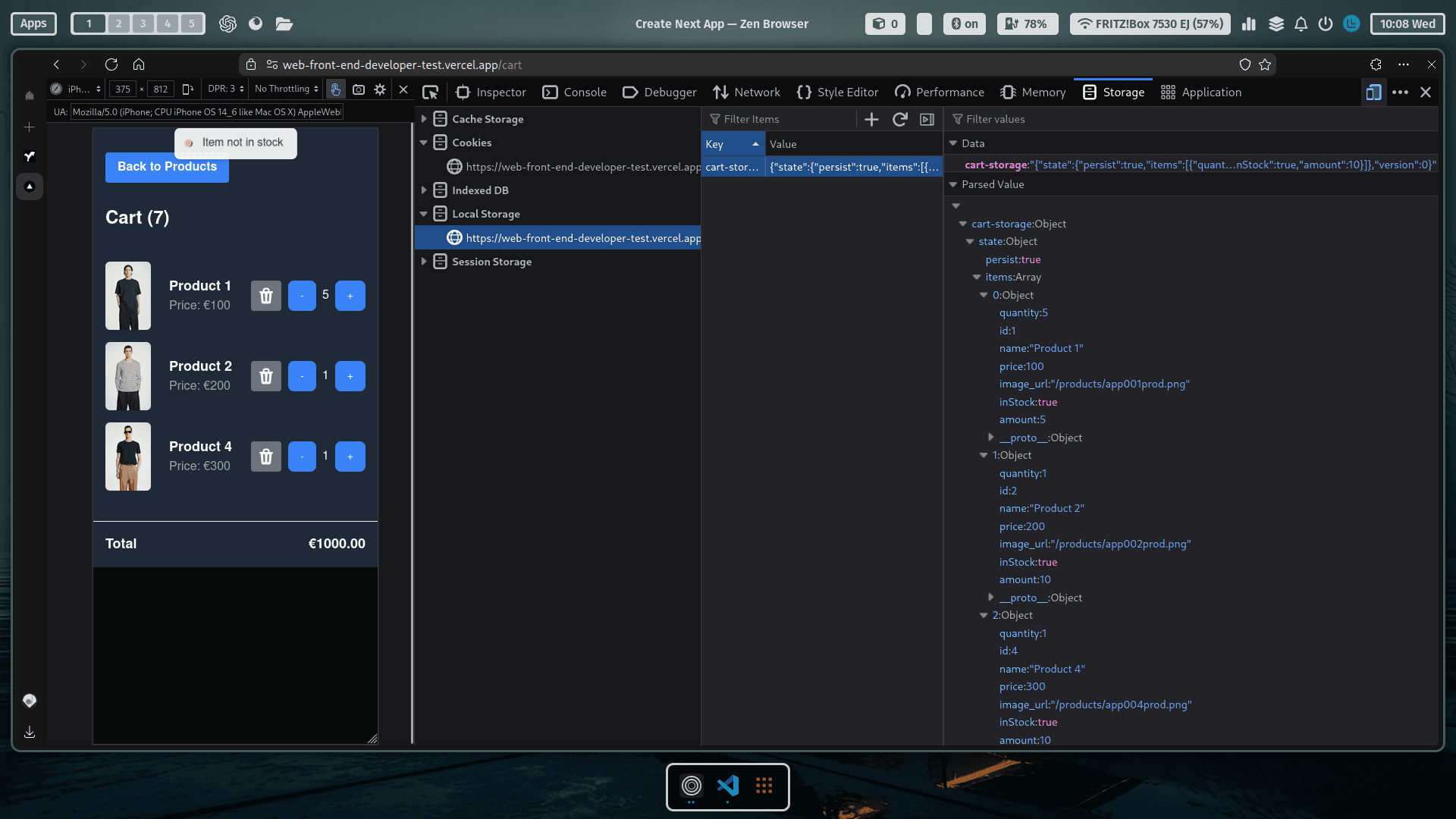
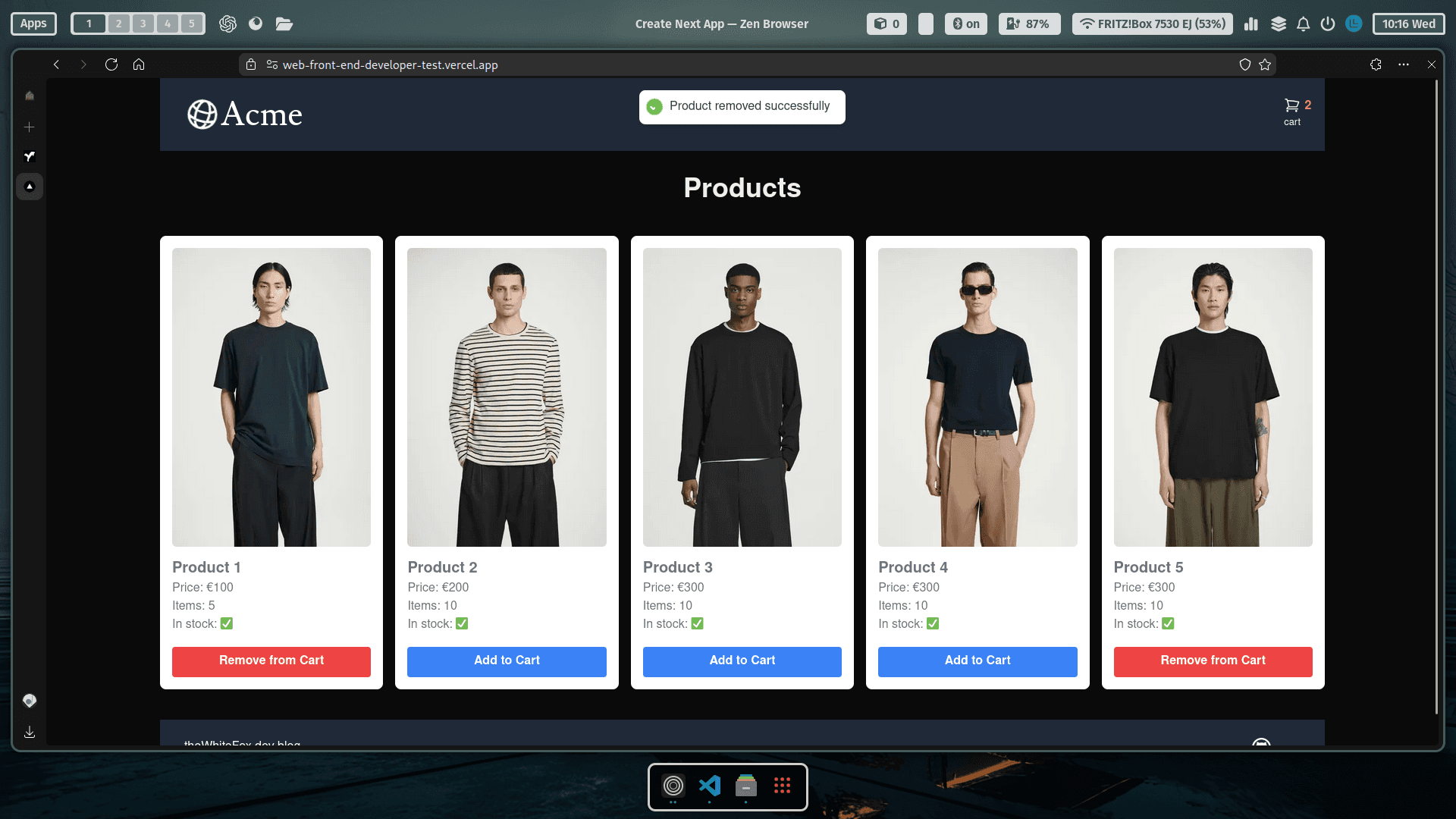
Display a list of products with their details. Add products to the shopping cart. Persist cart items in localStorage to maintain state across sessions. Load cart items from localStorage when the application mounts.
Server and Client Composition Patterns
app/page.tsx The main page component app/page.tsx is the entry point for the application:
- Fetches product data from the placeholder data
- Displays a list of products using the product table component
- Provides a cart icon in the header with real-time item count
- Uses the cart store for state management
- Displays a footer component with links
app/layout.tsx The layout component app/layout.tsx is the parent component for the application:
- Contains the global CSS and metadata configuration
- Provides the main layout structure with header and content areas
- Includes the Toaster component from the react-hot-toast library
app/lib/definitions.ts The definitions file contains TypeScript interfaces and types used throughout the application:
- Product interface
- Cart item interface
- Cart state interface
app/lib/placeholder-data.ts The placeholder data file provides mock product data for the application:
- Array of products with sample data
- Each product includes:
- id: unique identifier
- name: product name
- price: numeric price
- image: image URL
- inStock: availability status
- amount: quantity available
app/ui/header.tsx The header component app/ui/header.tsx contains the navigation and cart icon:
- Displays the site logo/name
- Shows the cart icon with item count
- Uses Tailwind CSS for styling
- Responsive design for mobile and desktop
- Updates cart count in real-time using Zustand store
The header is present on all pages and provides consistent navigation throughout the application.
app/ui/products/product-card.tsx The product card component app/ui/products/product-card.tsx displays individual product information:
- Shows product image, name, and price
- Add to cart button with quantity selection
- Responsive layout using Tailwind CSS
- Handles loading and error states
- Integrates with the cart store for state management
The component is reused across the application to display products consistently. It uses the following Tailwind CSS classes for styling:
- Card container: rounded shadow with hover effects
- Image container: fixed aspect ratio and object fit
- Product details: flex layout with proper spacing
- Add to cart button: primary color with hover state
- Price display: prominent typography
The component is built for reusability and maintains consistent styling across the application.
app/ui/products/product-cart.tsx The product cart component app/ui/products/product-cart.tsx displays a list of products in the cart:
- Shows product image, name, price, and quantity
- Quantity controls for each item
- Total price calculation
app/ui/products/product-table.tsx The product table component app/ui/products/product-table.tsx displays a list of products in a table format:
- Shows product image, name, price, and quantity
- Quantity controls for each item
- Total price calculation
Adding Tailwind CSS
In set up I chose tailwind
app/globals.css The global CSS file app/globals.css contains the base styles and Tailwind CSS directives.
Why Zustand? (The Case for Minimalist State)
In a Next.js environment, choosing the right state management is a balance between power and overhead. I choose Zustand over Redux or the native Connect Api for these specific reasons:
Zero Boilerplate: Unlike Redux, which requires actions, reducers, and constants, Zustand allowed me to define my state and actions in a single, cohesive store. This kept
cartStorefile readable and easy to maintain. cartStore.tsPerformance (No Unnecessary Re-renders): Context API can be a performance killer because every consumer re-renders when any part of the context changes. Zustand allows components to subscribe to the specific slices of state.
Persisting State: Zustand makes complex tasks like Persisting state (saving to localStorage) incredibly simple. I wrapped my store in a persist middleware in about two lines of code-something that requires a significant setup in Redux.
| Feature | Context API | Redux Toolkit | Zustand |
|---|---|---|---|
| Boilerplate | Low | High | Minimal |
| Learning Curve | Easy | Steep | Easy |
| Performance | Potential bottlenecks | Excellent | Excellent |
| Bundle Size | 0 (Native) | ~10kb+ | ~1kb local |
Zustand is a lightweight, fast, scalable state management solution. That is designed to be simple and easy to use. It's the choice for state management in this Next application.
State management with LocalStorage
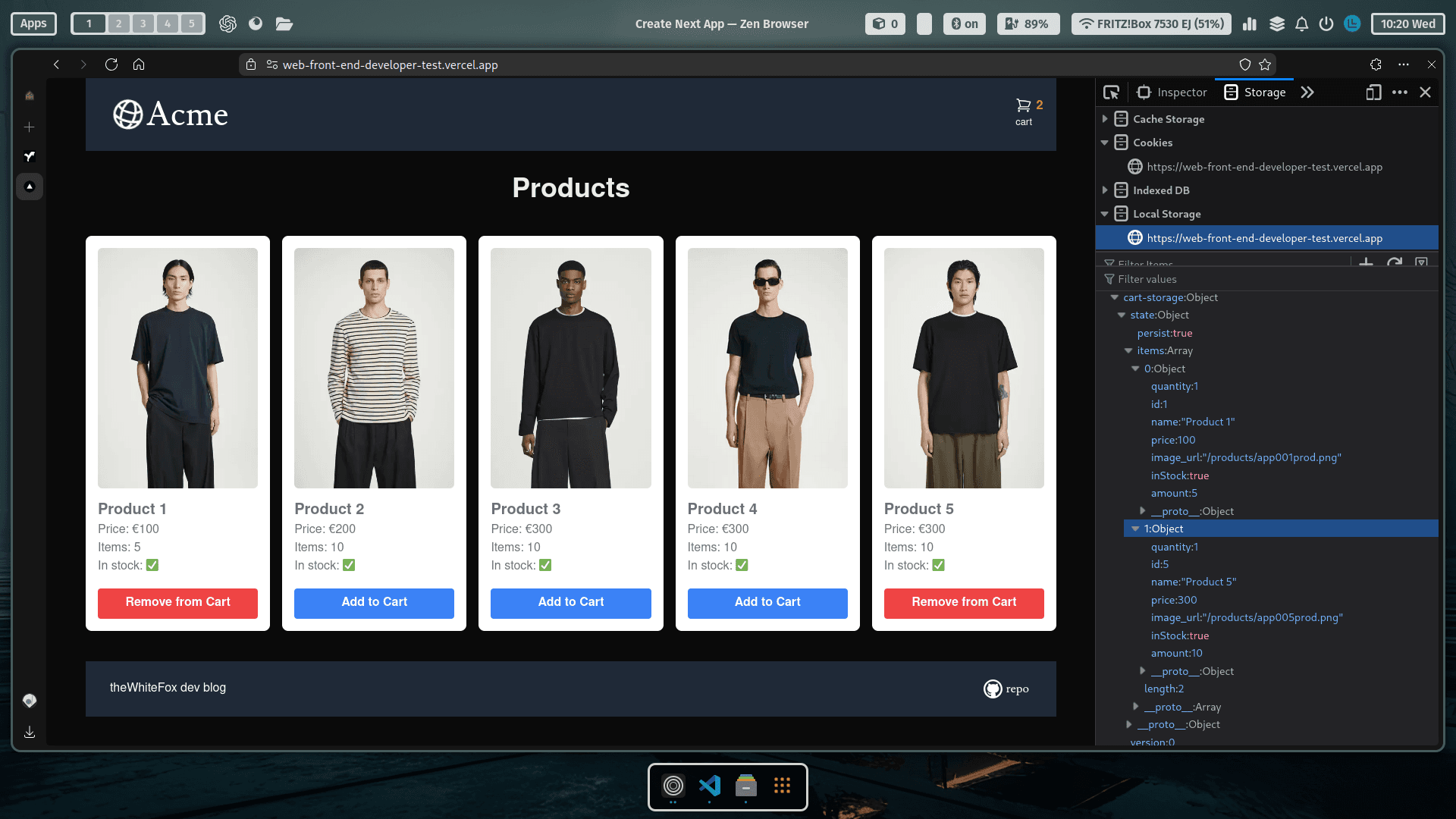
app/store/cartStore.ts The cart store app/store/cartStore.ts manages the state of the shopping cart:
- Cart items are stored in localStorage
- Cart state is managed using Zustand
- Actions include adding items, removing items, and updating quantities
- State is shared across components
import { create } from 'zustand'
import { persist } from 'zustand/middleware'
import { CartItem, CartState, Product } from '../lib/definitions'
import toast from 'react-hot-toast'

const useCartStore = create<CartState>()(
    persist(
        (set, get) => ({
            persist: true,
            items: [],
            addToCart: (product) => {
                let existingProduct: CartItem | undefined
                set((state) => {
                    existingProduct = state.items.find(
                        (item) => item.id === product.id
                    )
                    return {
                        items: existingProduct
                            ? state.items
                            : [
                                  ...state.items,
                                  {
                                      quantity: 1,
                                      id: product.id,
                                      name: product.name,
                                      price: product.price,
                                      image_url: product.image_url,
                                      inStock: product.inStock,
                                      amount: product.amount,
                                  },
                              ],
                    }
                })

                if (existingProduct) {
                    toast.error('Product Already exists')
                } else {
                    toast.success('Product Added successfully')
                }
            },
            remove: (product) => {
                const existingProduct = get().items.find(
                    (item) => item.id === product.id
                )
                if (existingProduct) {
                    set({
                        items: get().items.filter(
                            (item) => item.id !== product.id
                        ),
                    })
                    toast.success('Product removed successfully')
                } else {
                    toast.error('Product not found in cart')
                }
            },
            removeFromCart: (id: number) => {
                set({
                    items: get().items.filter((item) => item.id !== id),
                })
                toast.success('Item removed')
            },
            removeItemCart: (product: Product) => {
                set({
                    items: get().items.filter((item) => item.id !== product.id),
                })
                toast.success('Item removed')
            },
            updateQuantity: (type: 'increment' | 'decrement', id: number) => {
                const { items, removeFromCart } = get()

                const item = items.find((item) => item.id === id)

                if (!item) return

                // 1. Handle removal
                if (type === 'decrement' && item.quantity === 1) {
                    removeFromCart(id)
                    return
                }

                // 2. Handle stock limit

                if (
                    type === 'increment' &&
                    item.amount !== undefined &&
                    item.quantity >= item.amount
                ) {
                    toast.error('Max stock reached')
                    return
                }

                // 3. Update state immutably
                set({
                    items: items.map((i) =>
                        i.id === id
                            ? {
                                  ...i,
                                  quantity:
                                      type === 'increment'
                                          ? i.quantity + 1
                                          : i.quantity - 1,
                              }
                            : i
                    ),
                })
            },
        }),
        {
            name: 'cart-storage', // Uses localStorage by default
        }
    )
)

export default useCartStore
Reference
Photo by Jezael Melgoza on Unsplash